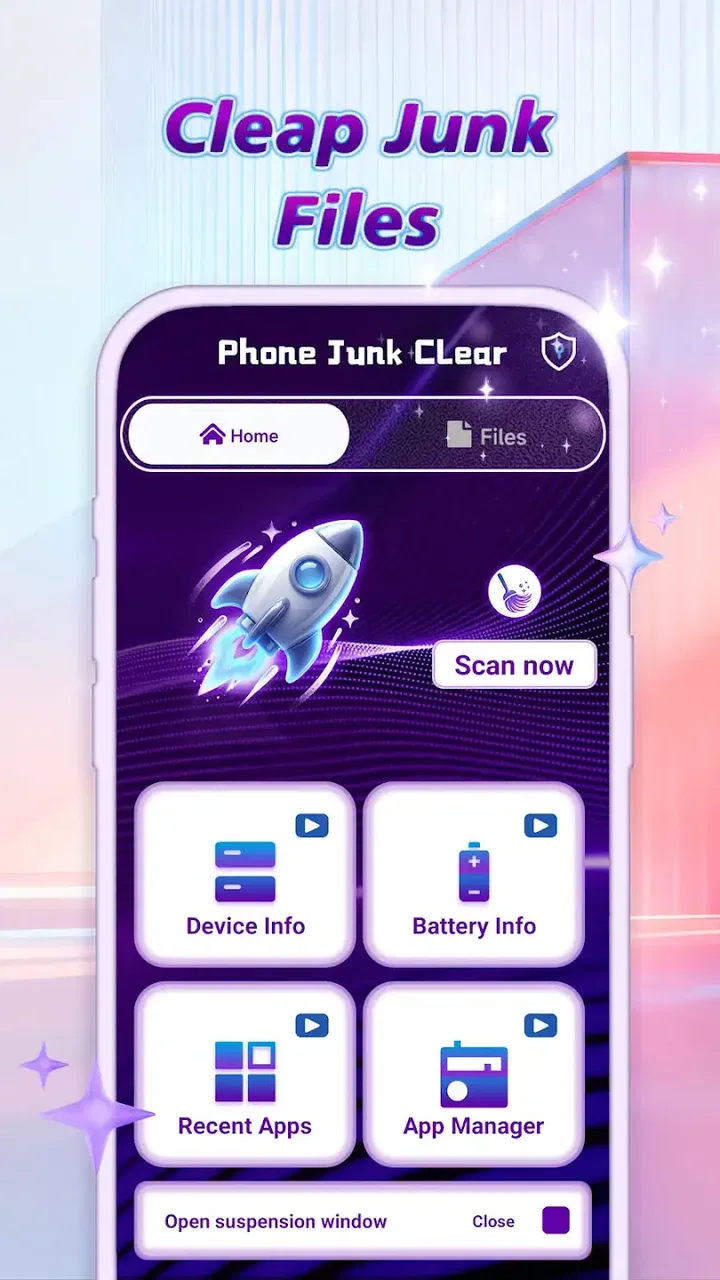
Phone Junk Clear
- 4.1
- Rating
- 50.00K
- Installs
- Free
- Price

 Analysis by App-foxy
When a phone starts feeling crowded, the problem is not always dramatic. Sometimes it is a pile of temporary files, forgotten downloads, duplicate-looking images, or leftover app material that makes everyday maintenance feel harder than it should. I tried Phone Junk Clear as a lightweight cleaning tool from Joy Hubs, and my first impression was straightforward: it is designed for people who want a portable way to review phone clutter without turning maintenance into a complicated project.
The app belongs to the tools category, is free to use, and has an Everyone age rating. Its store summary presents it as a deep phone-cleaning assistant, while the short store description is simply “Phone Junk.” That tells me exactly where its appeal lies: this is not meant to replace a file manager, cloud backup service, or full security suite. It is aimed at the small but recurring job of finding unwanted material and making a phone feel more manageable.
In my experience, that narrow purpose is useful. A cleaning app should not make me learn a new system before I can understand what it wants to remove. At the same time, “deep cleaning” is a phrase that deserves a careful reading. Removing clutter can help organization, but it is not the same as upgrading hardware, repairing a damaged operating system, or guaranteeing a dramatic speed boost. I approached it as a maintenance assistant rather than a magic performance button.
You May Also Like

 AccuWeather: Weather Radar
AccuWeather Review: A Quick, Clear Forecast for Everyday Decisions
For everyday plans, the best forecast is the one you can understand quickly. AccuWeather makes rain timing, radar, and local conditions easy to act on, with a few trade-offs.

 Hill Climb Racing
Why Hill Climb Racing Still Turns Crashes Into One More Run
A tiny car, a bumpy hill and one more upgrade: Hill Climb Racing keeps resurfacing because its simple chaos makes every near-miss feel personal.

 AliExpress - Shopping App
AliExpress Makes Global Shopping Feel Personal, but Shoppers Bear the Risk
AliExpress turns a global marketplace into a pocket-sized discovery engine. Its reach is useful, its shopping loop compelling, and its trade-offs easy to miss.

 Lords Mobile: Kingdom Wars
Lords Mobile Is a Kingdom-Building Routine, Not a Quick Match
A case-by-case verdict on the building, battles, device demands, and social commitments that make Lords Mobile rewarding for some players and exhausting for others.

 PDF Scanner app - TapScanner
TapScanner Makes Paperwork Easier to Capture, Check, and Share
TapScanner makes scanning with a phone feel less like a rescue operation and more like a dependable step in getting work done. Its capture tools are useful, though not flawless.

 Block Blast!
 Shows How Much a Puzzle Game Can Leave Out
A quiet grid game shows why puzzle players increasingly value instant clarity, repeatable skill and low-pressure play—and where the genre still needs to catch up.
More From Our News Desk
View All News


How the app feels during ordinary cleaning
The most important question for a tool like this is how quickly I can move from opening it to understanding what needs attention. Phone Junk Clear works best when I treat the scan as an inspection stage, not as permission to delete everything immediately. That distinction matters because a phone’s storage contains both obvious rubbish and files that may look disposable while still being useful.
For a routine check, I would open the app when storage begins to feel tight, let it examine the device, and then review the categories it presents before choosing what to clear. This workflow is more sensible than repeatedly browsing folders by hand. It gives the cleaning task a beginning and an end, which is particularly helpful for someone who does not want to become familiar with every storage location on an Android phone.
The perceived speed of a cleaner depends on the amount of material it has to inspect. A nearly empty phone and a device packed with photos, videos, downloads, and application leftovers are very different cases. I would therefore judge the app by how clearly it communicates progress and how easy it makes the review step, rather than expecting every scan to finish instantly. A thorough inspection naturally has more work to do than a quick glance at one folder.
One practical tip is to run a cleanup before a known storage-heavy activity rather than waiting until the phone refuses to install an update or save a recording. That gives me time to check the results calmly. It also avoids the common mistake of deleting in a hurry because a camera, messaging app, or operating-system update suddenly needs space.
The safest speed improvement is a better decision process, not blind deletion. I found that the app makes the most sense when I use it to narrow my attention to likely clutter, then confirm the items personally. That approach may take a little longer than tapping one large cleaning button, but it reduces the chance of losing something I intended to keep.
What happens when the phone is under pressure
Heavy-use moments are where expectations need to stay realistic. If the device is already busy with a large download, a video export, a system update, or several open applications, any storage scan may feel less immediate than it does during a quiet period. I would not start a deep maintenance session while relying on the phone for an urgent task. Instead, I would close what I do not need, connect to a stable power source if the session is likely to take time, and let the phone concentrate on the inspection.
This is also where a cleaner can reveal a trade-off. A scan has to look through enough information to identify possible junk, but the act of examining storage is not free from a device-resource perspective. On a modest phone, the process may be more noticeable than on a newer model. That does not automatically make the app inefficient; it simply means the best time to use it is when I am not simultaneously asking the phone to perform another demanding job.
My preferred routine is to clean in small sessions. Rather than waiting for the phone to become completely full, I would check it after a period of heavy media use or after removing several large applications. This makes the results easier to understand and limits the amount of material I need to verify at once. It is a less dramatic workflow, but it is more practical for everyday ownership.
There is another useful trade-off around temporary files. Some applications recreate cached material after it is removed, so a cleanup can provide short-term breathing room without permanently changing how those apps behave. That means I would not use the tool expecting one scan to solve storage pressure forever. If the same categories grow back quickly, the real cause may be offline media, automatic downloads, or a photo library that needs a longer-term organization plan.
For that reason, I would use Phone Junk Clear after identifying the source of the pressure, not instead of identifying it. If videos are the main problem, moving or deleting videos is more effective than repeatedly clearing small temporary items. If downloads are responsible, reviewing the download folder directly may be the better follow-up. The app can support that process, but it should not distract me from the largest files on the device.
Stability and confidence during a cleanup
Reliability means more than an app opening successfully. For a cleaning tool, I want a predictable scan, understandable results, and a clear moment where I decide what happens next. The current version is 1.0.1, so I view it as a relatively early product rather than a mature utility with a long visible history. That does not make it unusable, but it does make cautious habits especially important.
I would begin with an ordinary scan instead of immediately selecting every suggested item. After the results appear, I would inspect names, locations, file types, or categories wherever the interface allows it, and I would keep personal documents, recent downloads, work files, and irreplaceable media out of a first experiment. This is not a criticism unique to this app; it is the basic rule for any tool that can affect local storage.
A good recovery habit is to make sure important photos and documents already exist somewhere else before cleaning. Phone Junk Clear is most comfortable for me when it handles disposable material, not when I ask it to become my only line of defense against accidental loss. If I am uncertain about an item, I would leave it alone and return to it after checking the original application or file manager.
That caution also helps with false positives. A file can be old, large, or stored in a temporary-looking location and still be needed by an app or useful to me. The label “junk” is a practical category, not a guarantee that every item has zero value. I would rather recover a little less space than spend time trying to reconstruct a deleted document or re-download media.
The app’s public reception is modest but encouraging: it has a 4.1 average from around sixty ratings and has passed fifty thousand installs. I read that as evidence of early interest, not as proof that it will behave identically on every phone. Device brands, Android builds, storage layouts, and application habits can all affect what a cleaning tool sees and how comfortable the process feels.
One strength of a focused tool is that it can be easier to understand than a large all-in-one utility. I do not need a cleaner to become a battery manager, antivirus product, file-sharing service, or notification center. Keeping the purpose centered on storage makes it easier for me to judge whether a scan was useful. The limitation is that I should not expect it to solve problems outside that purpose.
Older phones, newer phones, and operating-system limits
Phone Junk Clear requires Android 10 or later. That requirement is important for anyone using an older handset, because the app is not a universal solution for every Android device. On a compatible phone, the experience will still vary according to available storage, processor speed, memory, and the number of files being inspected. A newer phone may complete maintenance with less noticeable interruption, while an older compatible model may benefit from shorter sessions.
Storage capacity also changes the meaning of a scan. A phone with ample free space may not gain much from cleaning small temporary items, even if the exercise improves organization. A phone that is constantly close to full has more to gain, but it also deserves more careful review because the pressure can encourage rushed decisions. I would use the app as a regular check on a crowded device, not as an excuse to ignore a growing collection of large personal files.
For people with limited technical confidence, the app can be useful because it gathers the maintenance task into one place. I would recommend it to someone who regularly forgets downloads, wants help identifying clutter, and prefers a guided review over manual folder hunting. It is also a reasonable option for a shared family phone where storage habits are messy and nobody wants to investigate every application separately.
I would be more selective for a power user who already understands Android storage and maintains a careful folder system. That person may get more control from the built-in file manager, application-specific storage controls, or a dedicated backup workflow. Those alternatives can expose context that a general cleaner may simplify. If I need to know exactly why a folder is large or which project a file belongs to, manual tools are often better.
Privacy-conscious users should apply the same judgment they would use with any storage utility. I would read the app’s permission prompts and only approve access that matches the cleaning task. I would also avoid treating a scan as a substitute for a backup. The convenience of a single maintenance screen is valuable, but convenience should not remove my responsibility for personal data.
A realistic weekly scenario
Imagine I spend a week taking short videos, downloading documents from messaging conversations, and saving several files for offline use. By the weekend, the phone warns that storage is getting low. Instead of deleting random items from a file browser, I open Phone Junk Clear and use it to identify likely disposable material first.
I review the results in groups. Temporary leftovers can be considered separately from downloads, and downloads can be checked against what I still need for work or travel. I keep recent recordings and documents, then remove only the items I recognize as unnecessary. Afterward, I open the camera and messaging applications to make sure normal saving and sharing still work. That final check takes little time and gives me more confidence than assuming a single cleanup action solved everything.
If the phone still feels crowded, I would not simply repeat the same scan. I would look at large videos, offline playlists, old conversation media, and applications I no longer use. This is one of the most useful lessons from using a cleaner: small clutter and major storage consumption are different problems. The app is helpful for the first, while the second often requires a personal decision about what to archive or remove.
For a less technical user, I would suggest making a short rule: never clean personal media during a rushed moment, and never select an uncertain category just because it promises more free space. That rule makes the app safer and turns it into a controlled maintenance habit instead of an emergency button.
Where it fits among familiar alternatives
The usual alternative is the phone’s built-in storage manager. That option is often the best choice when I want system-level context, direct access to large files, or controls tied closely to the device manufacturer. It may require more manual sorting, but it can also make the origin of a file clearer. Phone Junk Clear is more appealing when I want a focused cleaning pass and do not want to search through several menus.
A file manager is another strong alternative. It gives me detailed control over folders, filenames, and transfers, which is valuable for organized users. The trade-off is that I must recognize the clutter myself. Phone Junk Clear offers a more guided starting point, but I should still apply my own judgment before removal.
Cloud photo tools and backup services solve a different problem. They can help preserve important media while freeing local space, whereas a cleaner concentrates on unwanted or temporary material. If my phone is full because of irreplaceable photos, I would choose a backup-and-archive workflow before relying on a junk cleaner. The right tool depends on whether I need deletion, organization, or preservation.
I also prefer a focused cleaner over an overloaded utility when storage is my only concern. Extra features can be convenient, but they can make it harder to tell what an app is doing and why. Phone Junk Clear’s value is clearest when I use it for the narrow job it suggests: inspect clutter, review the candidates, and remove what I genuinely no longer need.
My performance verdict
After weighing speed expectations, heavy-use behavior, reliability, and device limits, I see Phone Junk Clear as a practical maintenance companion rather than a performance miracle. Its free price removes the main barrier to trying it, and its Everyone rating makes it approachable for general household use. Joy Hubs has kept the concept easy to understand, which suits people who want help with storage without becoming Android specialists.
I would recommend it to users on Android 10 or newer who frequently run short of space, accumulate temporary clutter, or want a guided alternative to manual file browsing. The best results come from using it periodically, reviewing suggestions carefully, and following up on the largest storage categories separately. That workflow is safer and more effective than expecting one tap to transform a crowded phone.
I would skip it if my main issue is a slow processor, weak battery, poor network connection, or a need for professional file recovery. Cleaning cannot change those underlying limits. I would also choose the built-in manager or a file-management workflow if I need precise folder-level control or have an established backup system already in place.
Overall, Phone Junk Clear earns a place as a simple, focused tool for everyday storage housekeeping. The early version means I would use it thoughtfully and keep backups of anything important, but the core idea is useful: bring likely clutter into view, make deletion a deliberate choice, and stop treating a full phone as an unavoidable part of daily life. For me, that makes it worth trying when storage maintenance has become a recurring chore rather than a one-time emergency.
FAQs for Phone Junk Clear
01What is Phone Junk Clear and how does it work?
Phone Junk Clear is a mobile application designed to optimize your smartphone by removing unnecessary files, cache, and junk data that accumulate over time. It scans your device to identify clutter and offers options to clean and speed up your phone. The app enhances performance by freeing up storage and improving battery life.
02Is Phone Junk Clear safe to use on my device?
Yes, Phone Junk Clear is safe to use. It employs secure algorithms to identify and delete only non-essential files that slow down your device. The app does not access personal data or sensitive information, ensuring your privacy is maintained while optimizing your phone’s performance.
03Does Phone Junk Clear support both Android and iOS devices?
Phone Junk Clear is available for both Android and iOS platforms. However, certain features may vary slightly between the two operating systems due to inherent differences in how they handle files and memory. Be sure to check the app store for compatibility with your specific device model.
04How often should I use Phone Junk Clear to maintain optimal performance?
To maintain optimal performance, it's recommended to use Phone Junk Clear at least once a week. Regular use helps prevent the accumulation of unnecessary files and keeps your device running smoothly. Some users prefer more frequent cleaning, especially after installing or uninstalling apps, to ensure maximum efficiency.
05Are there any costs associated with using Phone Junk Clear?
Phone Junk Clear offers a free version with basic cleaning features. However, for more advanced options and features, such as real-time monitoring and deeper cleaning tools, there may be a premium version available for purchase. Check the app store for pricing details and subscription plans.
Pros
- Efficiently cleans junk files quickly.
- User-friendly interface with simple navigation.
- Customizable cleaning options available.
- Low impact on battery and performance.
- Supports multiple file types for cleanup.
Cons
- Contains ads that may interrupt use.
- Limited features in free version.
- Occasional false positives in scans.
- No real-time monitoring available.
- Requires frequent updates for best performance.

Phone Junk Clear
Gallery